⏱
The average R5 spends 45 minutes retyping their roster into Google Sheets.
This does it in 2 minutes — from your phone, without a laptop.
Stop retyping 100 alliance names. Video → roster in 2 minutes.
Screen-record your Last War: Survival member list on your phone. Drop the video here. Get a ready-to-use CSV + JSON that plugs into every other tool at r5tools.io. Korean, Chinese, symbol-heavy names all handled. No spreadsheet. No manual entry.
✓ 94/94 accuracy typical
✓ Korean · Chinese · symbol names
✓ Feeds 7 alliance tools
✓ Roster history + power trends
$10 one-time · ~50 extractions per unlock · re-scan whenever your roster changes.
What it does — Screen-record your alliance member list on your phone, drop the video here, and get a ready-to-use CSV in about 2 minutes. Feeds every other tool at r5tools.io.
Cost — Free tier: 3 extractions per month. Paid unlock: $10 one-time for ~50 extractions.
Privacy — Your video is processed once and deleted immediately after. Only the resulting CSV/roster is saved (so you can see power trends over time). No re-use, no sharing.
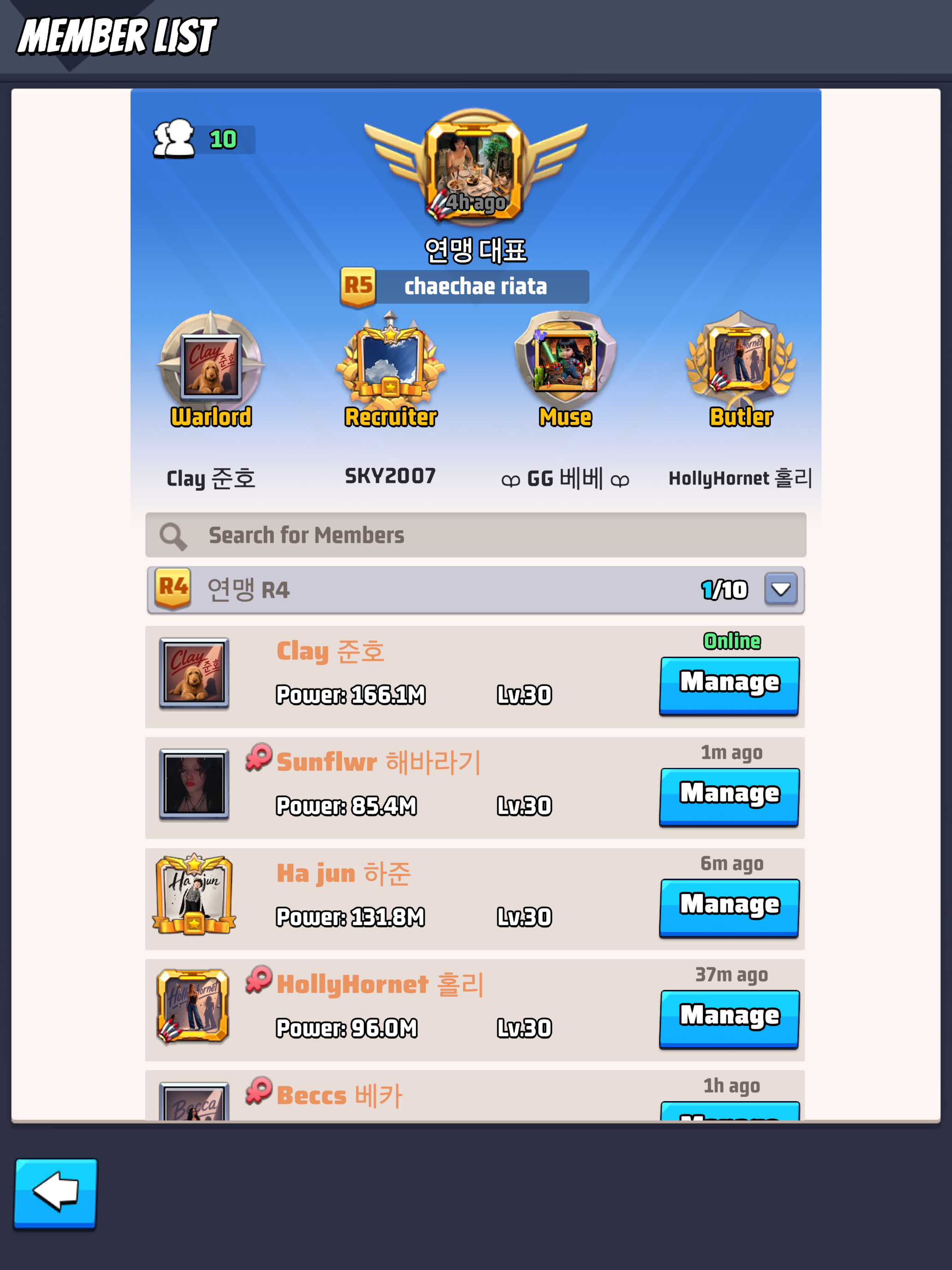
✓ Upload THIS screen — your Alliance MEMBER LIST
In-game: Alliance → your alliance name → Member List. Shows R5 at top, then R4/R3/R2/R1 rows with each member's name, power, HQ level, and Manage button.
Wrong screen? If you meant to scan every alliance in your WARZONE (not just members of yours), use Warzone Alliance List →
Drop your .mp4 or .mov here
or click to browse — max 500 MB — iPhone .mov and Android .mp4 both work
📋 For best results
Start recording BEFORE you scroll — capture the R5 (crown row) and Warlord (sword row) at the very top. Then scroll slowly, ~2 seconds per screen. A 94-member alliance takes ~90 seconds this way and captures cleanly.